Searching on Whiskybase helps you find whiskies, distilleries, bottlers, brands, and members quickly. The search tool looks through the full database and shows the most relevant results first.
TABLE OF CONTENTS
1. Browsing Whiskybase
Whiskybase is built around four main types of pages:
- Whisky pages show all information about that specific release.
- Distillery pages list all releases from that distillery.
- Bottler pages list every release from a bottler.
- Brand pages show all whiskies released under that brand name.
2. Using the general search
The search bar appears in the header of every Whiskybase page. Type your search term and press enter. You can also find the search page here.
The default search looks through 6 main categories:
- Whiskies
- Distilleries
- Bottlers
- Brands
- Members
Your results will also show filters such as Bottler, Brand, Vintage, Bottled, For sale, and Rating. These help refine wide searches into a more focused list.
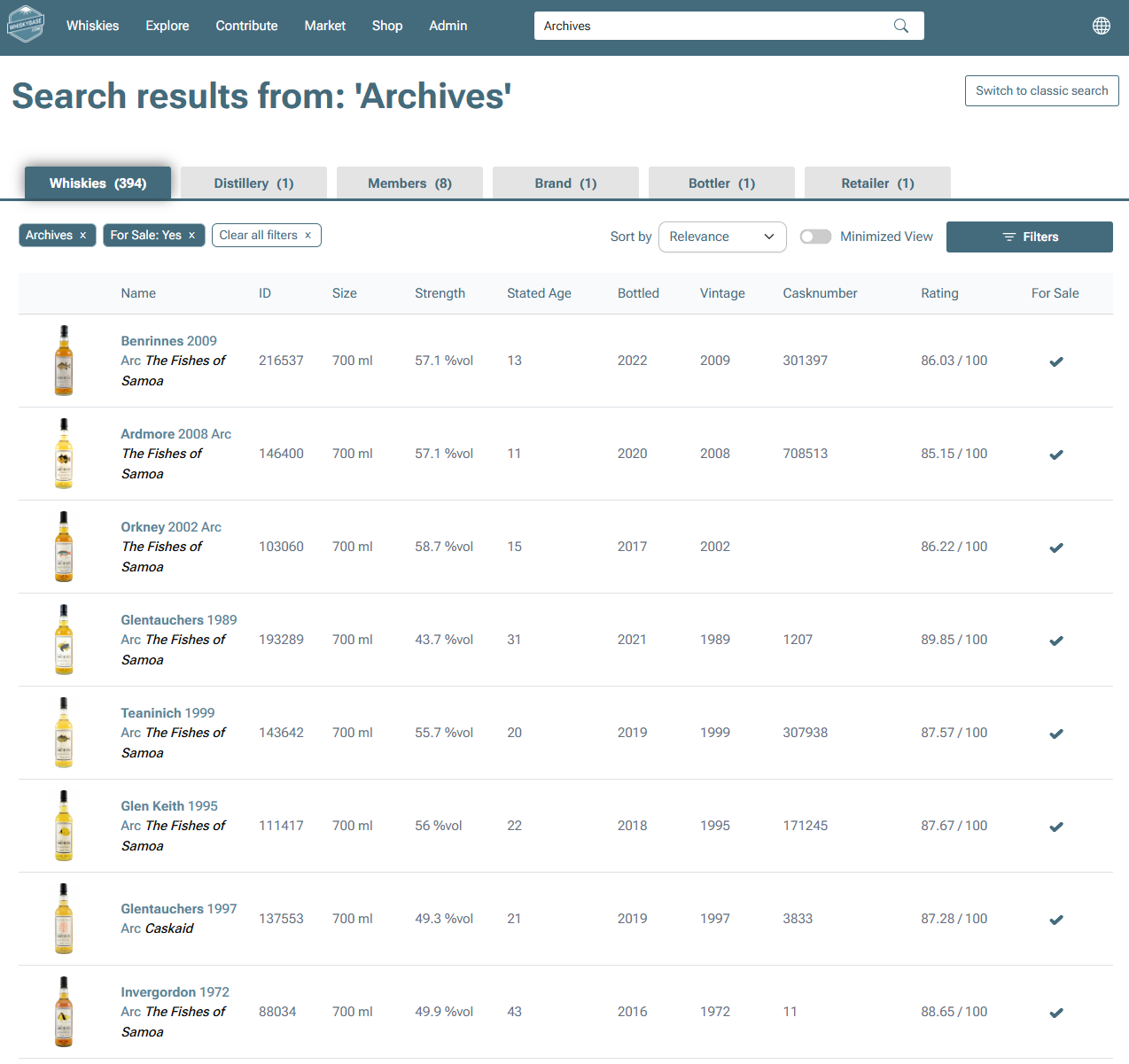
3. Best ways to search for a specific bottle
When you know part of the bottle details, simple combinations work best.
Try searching with:
- Brand + age
- Brand + vintage
Examples:
| Ardbeg 10 | Macallan 12 | Caperdonich 1972 |
Pro tip: To make the search even more precise, add the ABV(alcohol by volume).Example: Ardbeg 10 46.0%
Adding more specific details helps the system show the exact bottle you are looking for.
4. Using filters to narrow your results
If your search returns too many results, filters help you focus on the whiskies that match your preferences.
You can filter by:
- Category
- Brand
- Bottler
- Brand
- Stated age
- Vintage
- Bottled year
- Strength range
- Size
- Rating
- Single cast whisky
- Cask strength
- Chill filtered
- Colored
- For sale
Each filter reduces the number of results and makes your search more precise. Filtering is the fastest way to turn a large result set into a clear list of whiskies that match your taste or collection goals.
5. Searching with unique details
Using numbers or other identifiers is a powerful way to search the Whiskybase database more precisely. Below are the most helpful types of searches.
- Whisky id
Enter 282305 or WB282305to go directly to the whisky with that ID. - Numbers such as 2005
Searching a number such as 2005 will return all results where this number appears.This can include:
- Bottled year
- Vintage year
- Whiskybase ID
- Cask numberBecause numbers are used in many fields, results may be broader.
- Dates
Searching “11.12.1998” shows whiskies distilled or bottled on that date.
Searching “12.1998” finds whiskies from December 1998. - Barcode Search
Enter a barcode such as 5060044489730 to find all whiskies that match it.
This is especially helpful for modern releases. - Using ABV
Including the ABV can help you reach a specific bottle more quickly. Example: Ardbeg 10 46.0% or 46,0%. - Date search (older search tool)
Searching 11.12.1998 returns whiskies distilled or bottled on that date.
Searching 12.1998 finds whiskies from December 1998. - Bottle code search (older search tool)
Searching a code such as L4273CM000 helps you locate that exact bottle.
Date search and bottle code search are still available in the older search tool.
These methods are useful for tracking older releases or bottles with more specific details.
Was this article helpful?
That’s Great!
Thank you for your feedback
Sorry! We couldn't be helpful
Thank you for your feedback
Feedback sent
We appreciate your effort and will try to fix the article