The Wishlist feature helps you keep track of whiskies you would like to own in the future. It is a simple way to follow releases, watch for new bottles on the Market, and stay updated when something you want becomes available.
TABLE OF CONTENTS
- 1. How to add a whisky to your Wishlist
- 2. How to receive notifications from your Wishlist
- 3. How to see which Wishlist items are for sale
- 4. How to remove a whisky from your Wishlist
1. How to add a whisky to your Wishlist
Find the whisky you are interested in by searching for it, or by browsing a distillery or bottler page.
Open the whisky page.
Click on "♡ Add to wishlist" under the whisky name to add it to your Wishlist.
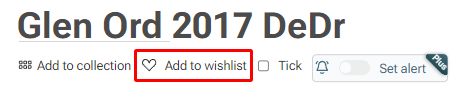
Once selected, the whisky is saved to your personal Wishlist.
Additional options for Whiskybase Plus members
Whiskybase Plus members can set alerts on individual whiskies. You can choose to be notified as soon as a bottle from your Wishlist becomes available on the market. You can also set a maximum price you are willing to pay, and you will only receive notifications for listings at or below that amount.
2. How to receive notifications from your Wishlist
If someone lists a whisky on the Whiskybase Marketplace and that whisky is in your Wishlist, you will receive a notification. This helps you act quickly when a bottle you want becomes available.
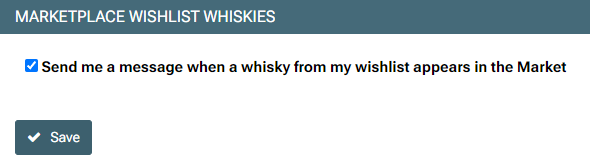
To receive these alerts, enable the setting "Marketplace: Wishlist whiskies" in your notification preferences under "Edit profile."
3. How to see which Wishlist items are for sale
You can easily check which whiskies in your Wishlist are currently being sold on the Whiskybase Marketplace.
Go to Market
Select Items I want
You will see a list of all whiskies from your Wishlist that are available to purchase from other members.
4. How to remove a whisky from your Wishlist
You can remove items in two ways:
On the bottle's page, click the heart "add to collection" icon again to deselect it.
Go to your Wishlist, select the whisky you want to remove, and choose the trashcan icon.
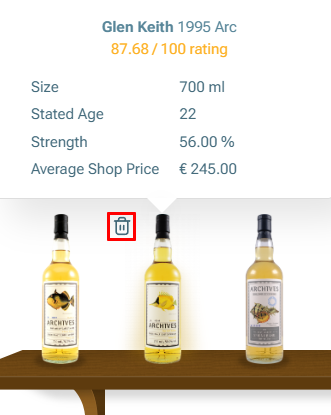
A pop-up message will appear to confirm your selection.
This will remove the whisky from your Wishlist.
Was this article helpful?
That’s Great!
Thank you for your feedback
Sorry! We couldn't be helpful
Thank you for your feedback
Feedback sent
We appreciate your effort and will try to fix the article