Adding a bottle to Whiskybase is one of the most meaningful things you can contribute as a member. It helps other whisky lovers discover new releases, learn about different bottlings, and explore the world of whisky.
By submitting a bottle, you are taking a great moment in your whisky journey and becoming a true whisky explorer.
If you are a more experienced member or want to learn the detailed rules for adding and editing bottles, you can continue to the advanced guidelines for adding and editing bottles on Whiskybase.
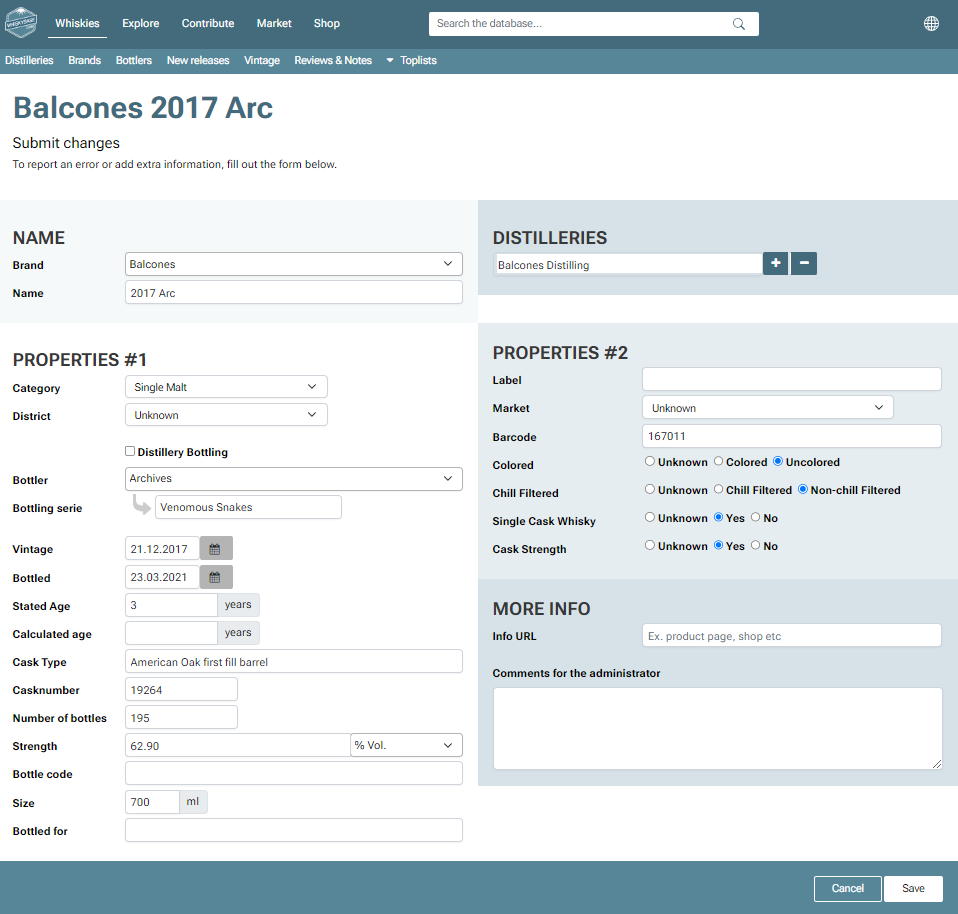
This guide uses Balcones 2017 Arc as the example bottle so you can follow along easily.
As seen below, this is what the form '"send a bottle" will look like. You can add all the information here.
Once the submission has been approved, the bottle will go live on Whiskybase and the bottle's page will be published.
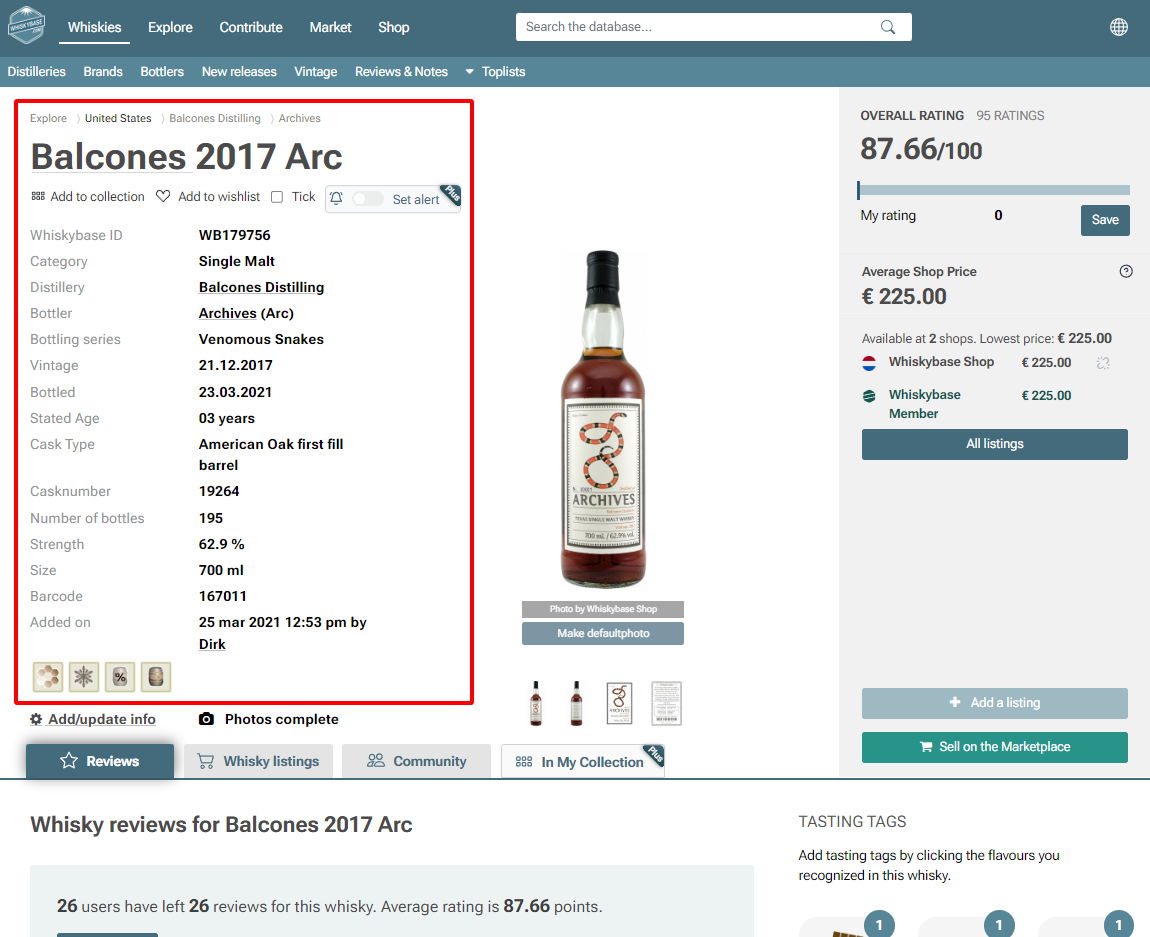
TABLE OF CONTENTS
- Table of Contents
- 1. Check if the bottle already exists
- 2. Gather information from the label
- 3. Fill in the Name section
- 4. Fill in Properties #1
- 5. Fill in Properties #2
- 6. More Info section
- 7. Final checks before submitting
- 8. What happens next
- 9. Points earned and your Whiskybase journey
1. Check if the bottle already exists
Search for:
• Balcones
• Arc
• 2017
• Venomous Snakes
If the bottle appears in the search, you do not need to add it.
2. Gather information from the label
Everything you enter must come from the label or an official webpage.
If you would like to learn how to interpret the information on a whisky label, you can refer to our article how can I understand the information on a whisky label?
Example: Balcones 2017 Arc
| FIELD FROM LABEL | EXAMPLE VALUE | EXPLANATION |
|---|---|---|
| Brand | Balcones | Producer name |
| Distillery | Balcones Distilling | Where the whisky was made |
| Bottle name | 2017 Arc | Vintage + bottler abbreviation |
| Bottler | Archives (Arc) | Company that bottled it |
| Bottling series | Venomous Snakes | Series name |
| *Vintage | 21.12.2017 | Distillation date (vintage = year distilled) |
| *Bottled | 23.03.2021 | Bottling date |
| Age | 3 years | Years in the cask |
| Cask type | American Oak first fill barrel | Type of wooden barrel used |
| Cask number | 19264 | Barrel ID |
| Bottles | 195 | Total bottles made |
| ABV(alcohol-by-volume) | 62.9 percent | Alcohol strength |
| Size | 700 ml | Bottle volume |
| Barcode | 167011 | Product code |
*Dates and formatting:
• Use numeric format: dd.mm.yyyy
• Day and month are optional, but use four digits for the year.
• Seasons (Spring, Winter) may be used if printed.
• Do not write months as words or use hyphens.
3. Fill in the Name section
| FORM FIELD | IMPUT FOR THIS EXAMPLE |
|---|---|
| Brand | Balcones |
| Name | 2017* Arc** |
*2017 = vintage year
**Arc = abbreviation for the bottler “Archives”
4. Fill in Properties #1
| FORM FIELD | EXAMPLE VALUE | EXPLANATION |
|---|---|---|
| Category | Single Malt | Whisky type |
| District | Unknown | Only fill if on label |
| Distillery bottling | Leave unticked | Only if producer bottled it |
| Bottler | Archives | Bottling company |
| Bottling series | Venomous Snakes | If printed on label |
- Dates
| FORM FIELD | EXAMPLE VALUE | EXPLANATION |
|---|---|---|
| Vintage | 21.12.2017 | Distillation date |
| Bottled | 23.03.2021 | Bottling date |
- Age
| FORM FIELD | EXAMPLE VALUE | EXPLANATION |
|---|---|---|
| Stated age | 3 | Only if printed |
| Calculated age | Leave empty | Do not calculate yourself |
- Cask and bottle details
| FORM FIELD | EXAMPLE VALUE | EXPLANATION |
|---|---|---|
| Cask type | American Oak first fill barrel | Barrel used |
| Cask number | 19264 | Barrel ID |
| Number of bottles | 195 | Total bottles made |
| Strength | 62.9 percent | ABV exactly as printed |
| Bottle code | Leave empty | Only if printed |
| Size | 700 ml | Bottle volume |
| Bottled for | Leave empty | Only if label says “For X” |
| Initial retail price | Leave empty | Optional |
5. Fill in Properties #2
| FORM FIELD | EXAMPLE VALUE | EXPLANATION |
|---|---|---|
| Label | Unknown | Only if printed |
| Market | Unknown | Only if printed |
| Barcode | 167011 | From label |
- Additional attributes
Only select these if the label clearly states it.
| FORM FIELD | EXAMPLE VALUE | EXPLANATION |
|---|---|---|
Colored  | Uncolored | Added color; only choose Yes if label says so |
Chill filtered | Non-chilled filtered | Filtration step; choose Yes only if printed |
Single cask whisky | Yes | Whisky comes from one barrel |
Cask strength | Yes | Bottled at natural alcohol level |
| Core range* | No | This is a special release |
*A core range is the regular, continuously produced lineup of whiskies that represents a distillery or brand’s standard offerings.
6. More Info section
| FORM FIELD | EXAMPLE VALUE | EXPLANATION |
|---|---|---|
| Photo | Upload a clear label photo | Required unless URL is provided |
| Info URL | Add official page link | Helps verification |
| Comments | Optional | Add any useful notes |
7. Final checks before submitting
Before clicking Save, confirm:
• Everything matches the label
• No information was guessed
• Optional fields only filled when shown
• The bottle does not already exist
Click "Save'' when ready.
8. What happens next
An administrator or Whiskybase specialist will review your submission to make sure the information matches the bottle label and follows the database rules.
Once approved, you will receive a system message confirming that your bottle has been added to Whiskybase.
9. Points earned and your Whiskybase journey
Submitting a bottle earns you 3 points.
Every point brings you closer to higher membership levels such as Senior Member, Senior Expert, and eventually Connoisseur.
Adding a bottle is an exciting part of your whisky journey and makes you an important contributor to the Whiskybase community. Thank you for sharing your bottle and helping other whisky explorers.
Was this article helpful?
That’s Great!
Thank you for your feedback
Sorry! We couldn't be helpful
Thank you for your feedback
Feedback sent
We appreciate your effort and will try to fix the article