Selling whisky on the Whiskybase Marketplace should be as smooth as your favorite dram.
This guide walks you through creating your seller profile, adding your bottle for sale, and completing your first safe and successful transaction.
TABLE OF CONTENTS
- 1. Setting up your Seller Profile
- 2. Adding a bottle to the Marketplace
- 3. Choosing how to sell your bottle and setting a price
- 4. How a bottle is sold
- 5. Shipping whisky or arranging a pick up
- 6. Buyer confirmation and getting paid
- 7. Rating your buyer
- 8. Removing the sold bottle from your personal collection.
1. Setting up your Seller Profile
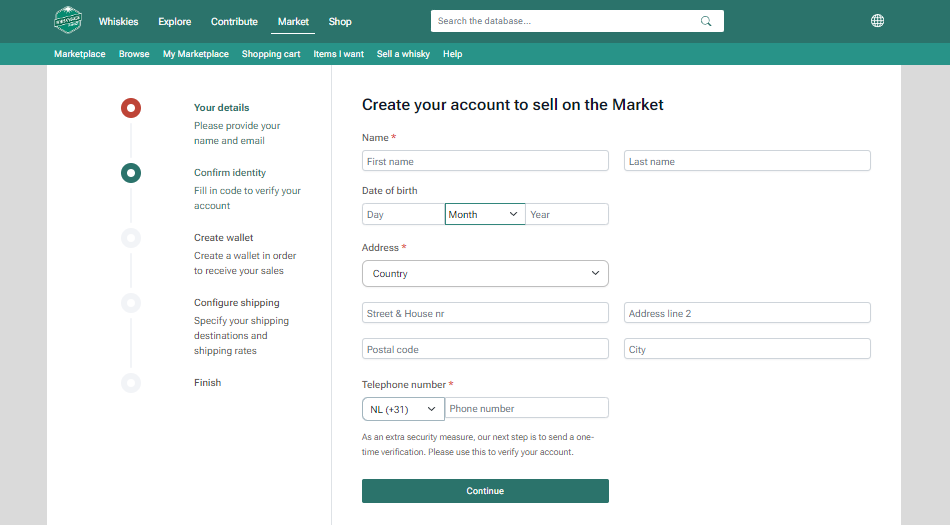
Before you can list a bottle, you must create and verify a Seller Profile.
Click your profile in the top right corner and select "Edit Profile."
In the left-hand menu, click "Market," then open "Set up my selling account."
Complete these onboarding steps:
Enter your contact and address details.
Confirm your identity by verifying your phone number.
In rare cases, the system has issues with some phone extensions and you might not get the verification message. In this case, please contact us so we can manually verify your identity.
Connect a payment provider to create a sales wallet:
EU users: create (or connect) a Stripe wallet
Users outside the EU: create (or connect) a PayPal wallet
Configure shipping by specifiying your shipping destinations and rates.
For more details about how to set up shipping rates, see Set up shipping rates.
FAQ: Why do I need to verify my details?
Only verified sellers can receive payments. This verification step helps us maintain a safe and trustworthy Marketplace.
Example of the Marketplace Seller Profile form showing required details for verification.
2. Adding a bottle to the Marketplace
You can add your bottle in two ways:
| OPTION | HOW IT WORKS |
|---|---|
| 1. From the bottle's page on Whiskybase | Go to the bottle’s page in the Whiskybase database and click "Sell on the Marketplace" You can search all of Whiskybase here. |
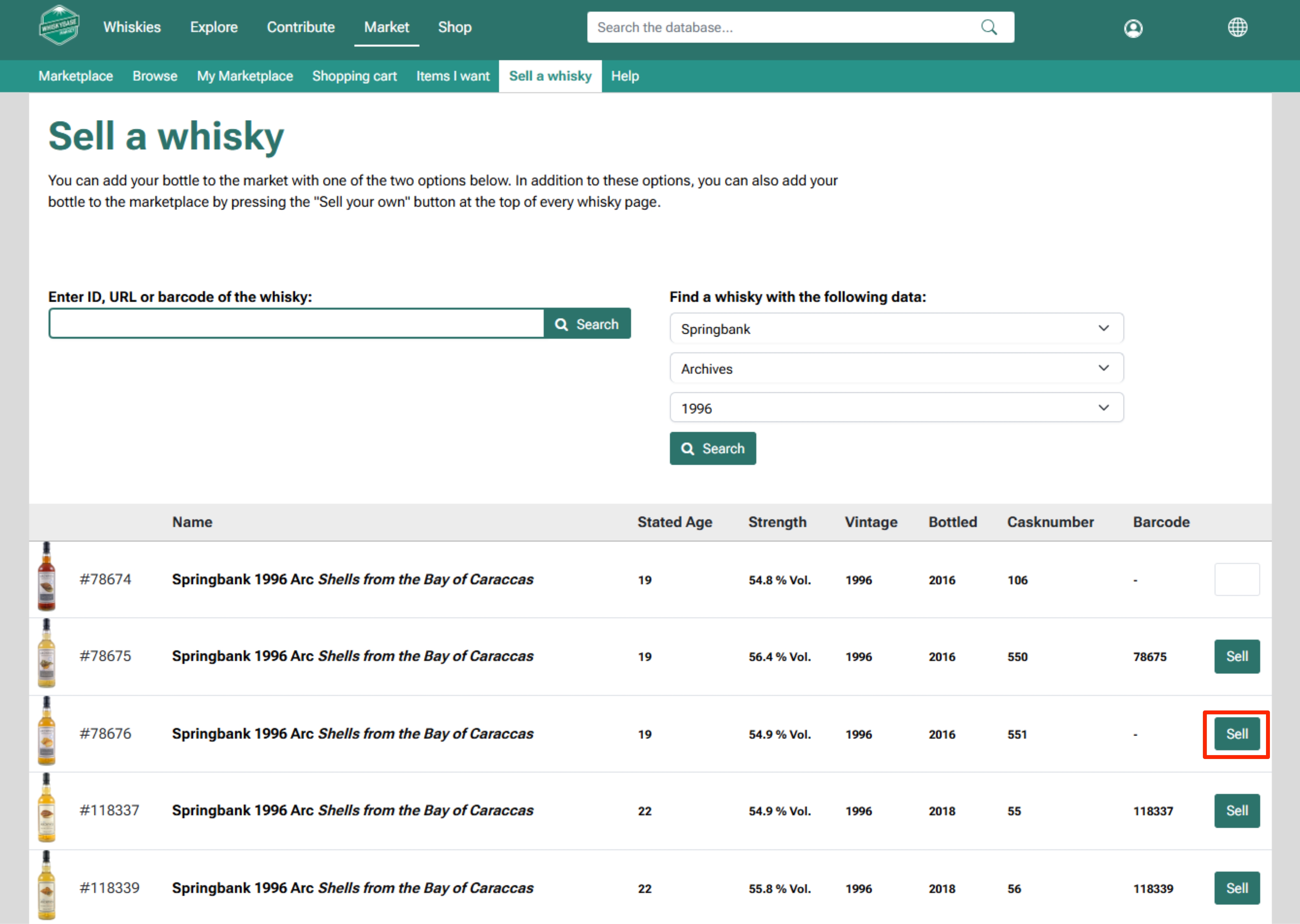
| 2. From your Seller dashboard | Go to Marketplace → Sell a whisky. Search by brand, bottler, or vintage, or enter the WhiskybaseID, barcode, or URL. Once you find the correct bottle, click on "Sell." |
Example of the Sell a whisky tab where you will be able to find the correct bottle that you want to sell.
After selecting your bottle, fill in the required details:
Condition of the whisky: state of the bottle, fill level, seal, and packaging.
Learn more about how to determine the conditions of your whisky here.
Add photos: upload clear images from several angles of both the bottle and the box (if applicable).
Extra info: describe flaws or unique features, for example:
“Label is torn 2 cm in the right-hand corner.”
“Seal is slightly damaged.”
“Original signature of distillery manager on label.”
You can also use the personal reference field to add a unique code that will show up on the order page.
Honest descriptions help prevent misunderstandings and strengthen your seller reputation. Buyers rate you after each sale, and a strong rating helps your future sales.
Tip: Add clear, detailed photos to avoid misunderstandings and increase trust with buyers.
3. Choosing how to sell your bottle and setting a price
After entering the bottle details, select how to sell it and set your price.
| SELLING METHOD | HOW IT WORKS | NOTES |
|---|---|---|
| Sale | You set a fixed price and the bottle appears in the Marketplace “shop window.” | The Price Helper instantly gives you key market data: the lowest current retail price and the price and date the last time the bottle sold on the Marketplace. |
| Auction | You set an end date, and enter the minimum bid. | If a bid is placed within 5 minutes before closing, the auction automatically extends by 5 minutes. Only buyers from countries you select can participate. |
Not sure how to price your bottle? You can learn here how to set the right price for your bottle.
Once all the information is added, click "+ Add to the Marketplace" to finish adding your bottle.
FAQ: Can I change my price later?
Yes. Edit your price any time in My Marketplace → Whiskies.
4. How a bottle is sold
In a Direct Sale, the bottle is sold when a buyer adds it to their cart and pays through their preferred method.
In an Auction, the highest bidder wins and pays after being notified.
You will receive a confirmation as soon as payment is completed.
Track your sales under My Marketplace → Dashboard.
| STATUS | MEANING |
|---|---|
| Unpaid | A buyer has purchased a bottle via direct sale or auction, but payment has not yet been completed. |
| Paid | Payment is confirmed. You should now ship the bottle. |
You can read more about what happens after your bottle is sold in the following article: What happens after your bottle sells
5. Shipping the whisky or arranging pickup
Congratulations, you've found a buyer! Now it's your responsibility to ensure your bottle gets to them securely.
First, it’s important to fully understand the risks associated with shipping bottles of whisky. We strongly recommend reading this article before sending any bottles: General shipping advice for whisky bottles
Tip: You can always offer local pickup when listing your bottle. Buyers near you can collect it in person, avoiding shipping risks and costs. Always use the order page to arrange and confirm a successful handover.
After payment is confirmed, ship the bottle as soon as possible. Fast, safe delivery improves your Seller reputation.
Packing and wrapping:
Use a sturdy box with enough padding so the bottle does not touch any of the box's sides.
Wrap the bottle in bubble wrap and fill empty spaces with soft material. Note—paper or "dissolvable" packing material is not advisable when shipping liquids like whisky!
If the bottle has its original box or tube, ensure it cannot move, thereby damaging the original packaging. Wrap both together carefully and securely.
Close securely with strong tape and mark the top with arrows.
Do not write “whisky” or other identifying words on the box.
- Make sure to write the addressee's full address information on a large and easy-to-read label.
- Add the buyer’s telephone number for the courier.
- Include your return address.
Want to learn how to properly pack your bottle for shipment? You can find a more detailed article here.
Registered and insured mail:
- Always ship the bottle with registered and insured mail. Confirm that the declared value is fully covered and check for restrictions.
- This is extremely important in the event that the bottle gets damaged or lost during transit.
- Add the complete and functional tracking code on the order page (click “Ship order”).
- The buyer can then follow the shipment.
6. Buyer confirmation and getting paid
When the bottle arrives, we prompt the buyer to accept or decline the bottle. Once the buyer accepts the order through the platform, the payment is released automatically to your connected payment provider (Stripe or PayPal).
Experienced buyers typically accept the bottle right away, although we allow buyers seven days from the delivery date to approve or decline the shipment. After delivery, the system will automatically send reminder notifications to the buyer, prompting them to take action and confirm the order status.
Rest assured, your payout is guaranteed. If seven days have passed since the successful delivery and you have not received any response from the buyer, please contact our team by opening a support request here or sending an email to support@whiskybase.com.
If the buyer cancels or declines the shipment, the bottle must be returned to you. How refunds or costs are handled depends on the reason for cancellation. For full details about cancellations, go to the following article.
7. Rating the buyer
After receiving payment, rate the buyer to complete the transaction.
You can rate from 1 (low) to 5 (high) for:
Payment – how quickly the buyer paid.
Communication – how did you exchange information and handle any issues.
Agreements – whether the buyer followed what was agreed.
Once your rating is submitted, the transaction is officially complete. Learn more about how feedback and ratings work on the marketplace.
8. Removing the sold bottle from your personal collection.
Even though the system automatically archives sold bottles, once your bottle is sold, please make sure it is archived and not available in the Marketplace by going to:
Market → My Marketplace → Whiskies, then select the bottle you wish to remove.
Click the "Edit" button in the upper-right corner of the page.
Scroll to the bottom and select "Archive".
This will remove the bottle from the Marketplace, but it will remain saved in your profile.
Next article: Set up your shipping rates – Learn how to define your shipping zones, delivery methods, and costs for your marketplace.Was this article helpful?
That’s Great!
Thank you for your feedback
Sorry! We couldn't be helpful
Thank you for your feedback
Feedback sent
We appreciate your effort and will try to fix the article